
Mobile App
A progressive web app that works offline, supports biometric login, and syncs in the background. Install from your browser — no app store needed.
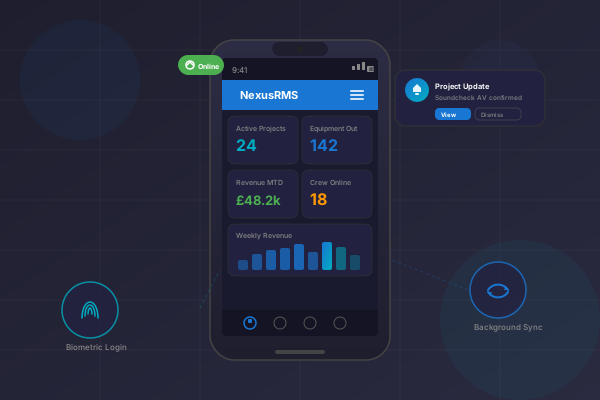
Complete Mobile Experience
A progressive web app with offline support, biometric login, and background sync for every workflow
Progressive Web App
Install directly on any device from the browser. Standalone mode with home screen shortcuts to Dashboard, Projects, Equipment, and Warehouse.
Offline Support
Full functionality without internet. Time clock, equipment scanning, and data entry all work offline with IndexedDB storage.
Background Sync
Automatic data synchronisation when connectivity restores. Priority queue processing: time clock first, then equipment, then everything else.
Biometric Login
Fingerprint and face recognition authentication. Challenge-response flow with device binding for secure access.
Push Notifications
Real-time alerts for project updates, deliveries, and equipment status changes. Custom action buttons with click tracking.
QR/Barcode Scanner
Equipment scanning with offline queue support. Batch scanning mode for warehouse operations. Quick-info lookup returns data in under 100ms.
GPS Time Clock
Clock in and out with location verification from your phone. Break tracking, photo capture, and offline support with auto-sync.
Mobile Dashboard
Key performance indicators optimised for small screens. Active projects, equipment currently out, and financial summaries.
Warehouse Operations
Check-in/out scanning, packing list access, and stock level viewing. Dedicated caching strategy for warehouse data.
Multi-Context PWA
Separate PWA manifests for tenants, freelancers, clients, and administrators. Each context has tailored shortcuts and branding.
Offline-First Architecture
IndexedDB-based storage with 200MB allocation. Every critical workflow functions without connectivity, syncing automatically when you are back online.

Mobile API
50+ dedicated endpoints optimised for mobile payloads and latency. Biometric and token authentication keep every request secure.
Fast Responses
Less than 100ms response for cached data.
Tiny Payloads
Less than 2KB payload per response.
Rate Limited
120 requests per minute rate limit.
Secure Auth
Biometric and token authentication.
PWA Installation
5 manifest variants for tenants, admins, clients, freelancers, and the main site. Each with tailored shortcuts and branding.
How NexusRMS Compares
See how our mobile experience stacks up against industry standards
| Feature | Industry Standard | NexusRMS |
|---|---|---|
| Offline Support | Online only | Full Offline |
| No App Store Required | App Store | PWA Install |
| Biometric Login | Password only | Face/Fingerprint |
| Background Sync | Manual refresh | Priority Queue |
| Push Notifications | Basic | Custom Actions |
| QR/Barcode Scanning | Limited | Batch + Offline |
| Multi-Context Manifests | Single app | 5 Variants |
Ready to Try Mobile App?
Start your 14-day free trial with full access to all features.
Start Free TrialNo credit card required • 14-day free trial • Cancel anytime